
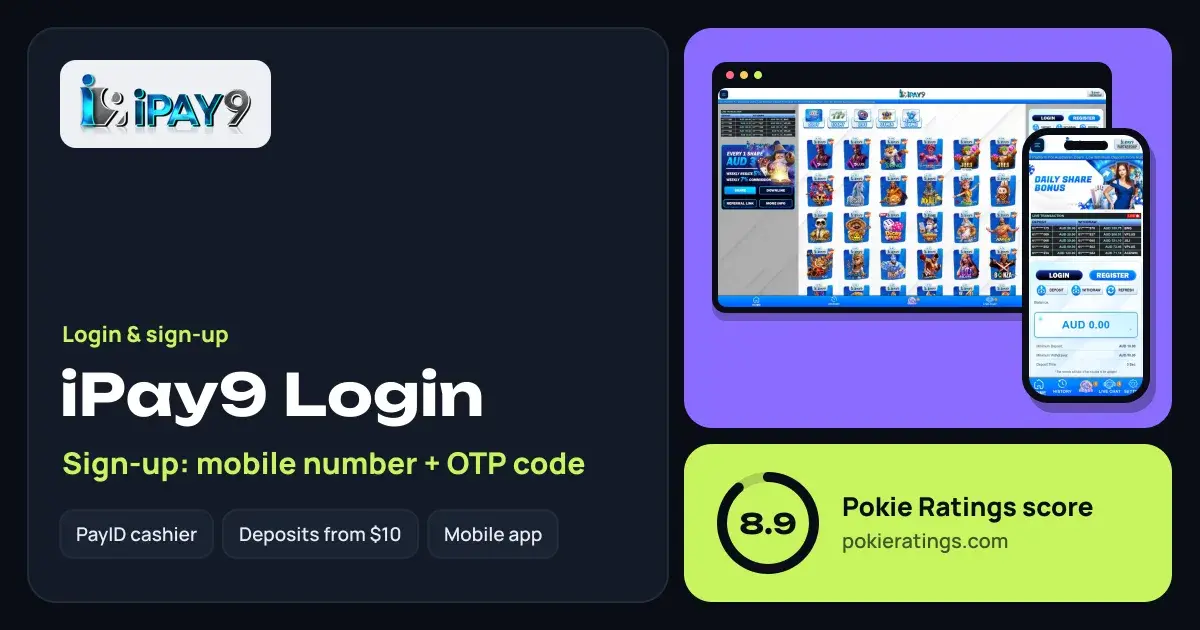
How to log in to iPay9
Short answer
Go to the official iPay9 site, tap the Login button above the balance panel and enter your registered details and password. There's nothing to download: iPay9 is a browser-based web app for iOS and Android. New players register with a mobile number and a one-time OTP code sent by SMS.
 8.9
iPay9
Pokie Ratings score
- Welcome offer
- 100% up to $250
- Min deposit
- $10
- Payments
- PayID, POLi, Bank transfer, Apple Pay, Google Pay, USDT, Bitcoin
- Withdrawals
- E-wallets 5–15 minutes, crypto 10–20 minutes, bank under 1 hour
- Sign-up
- Mobile number + OTP code
- App
- Browser-based web app for iOS and Android, no download needed
- Licence
- PAGCOR; Curaçao
Open the official site
Use our link, then bookmark the page so you always return to the real iPay9.
Tap Login
It's the dark button beside Register, in the panel that shows your AUD balance.
Enter your details
Type the mobile number or username and the password you chose at sign-up.
You're in
Deposit, Withdraw and Refresh sit right under the login buttons, with your balance below.
Creating an iPay9 account
Registration is built around your phone: the OTP code arrives by text, so keep it handy.
Tap Register
The bright button next to Login.
Add your mobile number
Request the OTP and type the code into the form.
Complete your details
Use your name exactly as it appears on your bank account; iPay9 matches it during the ID check.
Pick a password
Long, unique and not your birthday. Save it in your phone's password manager.
Fund your account
Deposit from $10 and look at the Bonus tab for the 100% match up to $250, explained on our iPay9 bonus page.
Forgot your iPay9 password?
Look for the password reset option on the login form and follow the code sent to your registered mobile. If it isn't there or the code doesn't come through, tap Live Chat in the bottom menu; it's reachable without being logged in. Give the agent your registered mobile number and name, and they can verify you and restore access.
OTP code not arriving?
| Cause | What to do |
|---|---|
| Number entered in the wrong format | Re-enter it the way the form shows, with or without the leading 0 |
| Weak signal | Toggle flight mode, wait for full bars and request a new code |
| Too many requests | Wait a few minutes; repeated requests can be paused |
| SMS filtered | Check your phone's spam or unknown-senders folder |
Still nothing after a couple of tries? Live chat can confirm the number on file and help you finish sign-up.
Logging in on mobile
iPay9 doesn't need an app download: it's a web app that runs in Safari or Chrome on iPhone, iPad and Android. To get a home-screen icon, open the site, tap Share (iPhone) or the three-dot menu (Android) and choose Add to Home Screen. Our casino apps guide explains why web apps are often the safer choice over APK files.
ID check before your first withdrawal
iPay9 runs a KYC check before withdrawals. Do it right after registering so you're never waiting on paperwork. Clear photos and a name matching your account get it approved first time.
Once verified, withdrawals start at $50 and are quoted at 5–15 minutes for e-wallets, 10–20 minutes for crypto and under an hour by bank. That speed is a big part of why iPay9 sits at the top of our PayID casino ranking.
Where to next
For the full picture on games, licences and banking, read our iPay9 review. Comparing options? Bunny96 and Victor96 also sign you up by mobile and SMS code, and the full list is on the Pokie Ratings home page.
iPay9 accounts are for 18+ only. Set deposit limits before you play, use BetStop if you need a break and reach Gambling Help Online on 1800 858 858. See our responsible gambling page.
Questions people ask
Can I use one iPay9 account on my phone and laptop?
Yes. iPay9 runs in the browser, so the same login works on your phone, tablet and computer. Balance, bonus progress and history are tied to the account, not the device.
Why does iPay9 need my mobile number?
Your mobile number is how iPay9 verifies new accounts: it sends a one-time OTP code that confirms the number belongs to you. It also helps support identify your account if you ever need a password reset or get locked out.
Is there an iPay9 APK for Android?
iPay9 doesn't use an APK. It's a browser-based web app for Android and iOS, so you simply open the site and log in. Adding it to your home screen gives you an icon that launches it like a normal app.
Do I need to verify my ID to log in to iPay9?
No, you can log in and deposit straight after registering. The ID check (KYC) is needed before withdrawals. Completing it early means your first cash-out runs at the quoted speed without waiting for documents to be reviewed.